Your shopping list, cleverly sorted
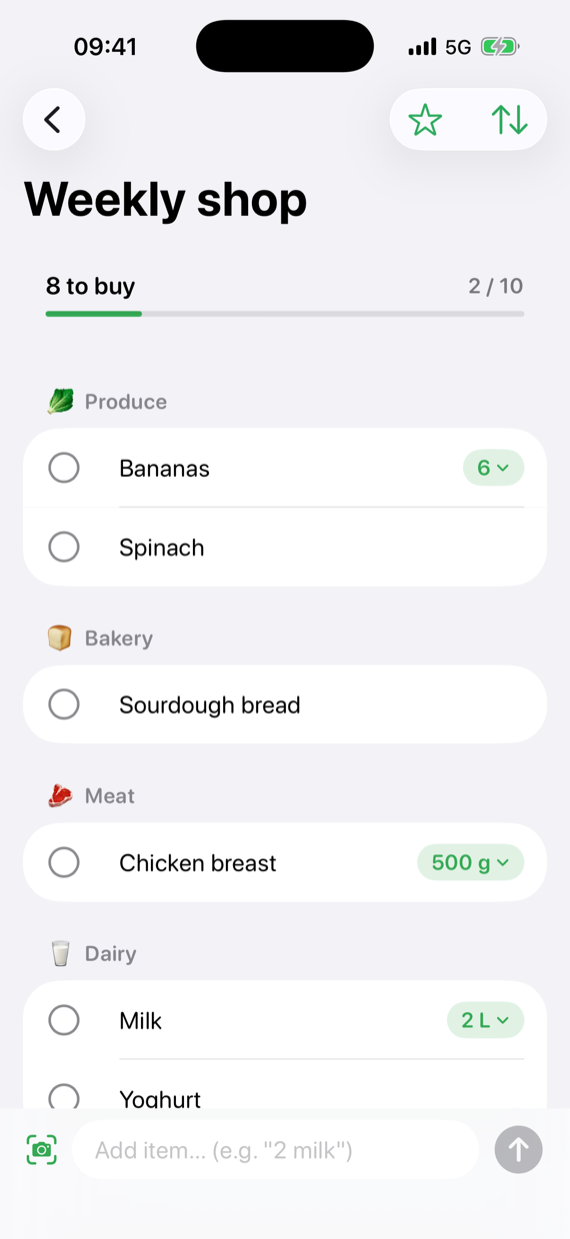
Type “carrots”, “whole milk” or “saumon” — every item lands in the right aisle at once. You walk the shop once, top to bottom, without ever doubling back.
For iPhone and iPad · Free with ads · Pro from CHF 1.00 a month
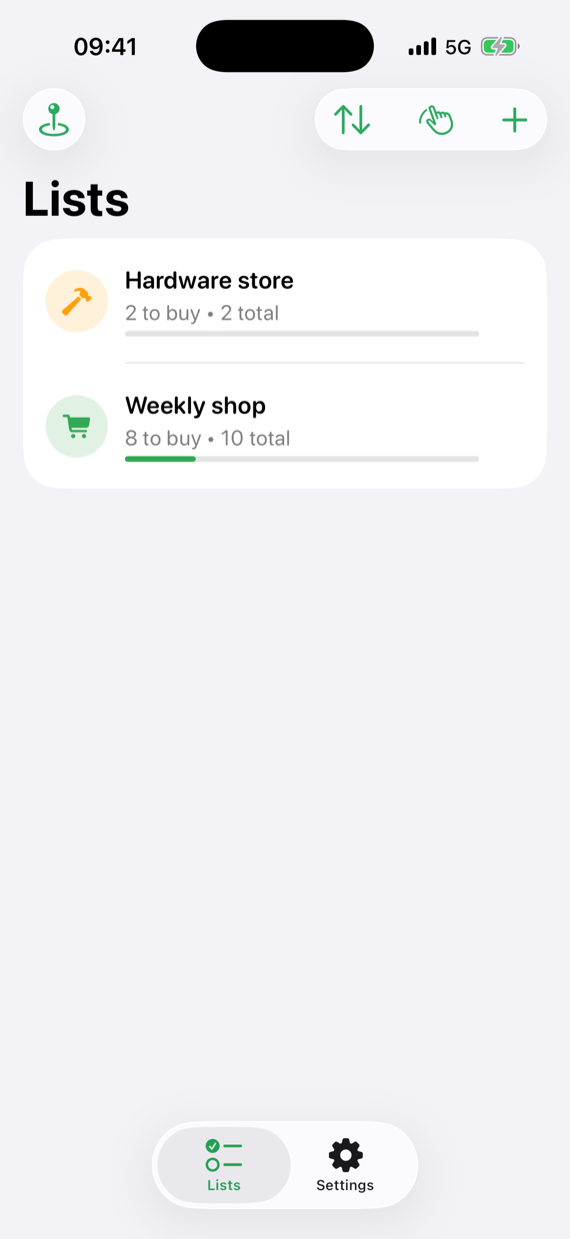
One list. Everybody's phone.
Share a list with your partner and you both work on the same one. He adds the milk from home while you are already standing in the shop — and it turns up on your phone. No extra account and no sign-up: it runs on the iCloud you already have.
- Invite by link or by name. You decide whether only invited people may join or anyone with the link — and you can end the share again at any time.
- Everybody in sees everything. Ticked off is ticked off, for all of you. And the person you invited needs no subscription for it.
- Your other lists stay yours. Only lists you explicitly share are visible to anyone else. Everything else syncs between your own devices and nowhere further.
And it does not buzz all afternoon
You hear when somebody joins, adds something or finishes the shopping — and otherwise the app is quiet. Nothing about your own changes, nothing about a list you have open, and one notification instead of twenty when somebody types for ten minutes. Where the limits lie is spelled out on the “Notifications” page.
How the notifications work →
The app learns how you walk the shop
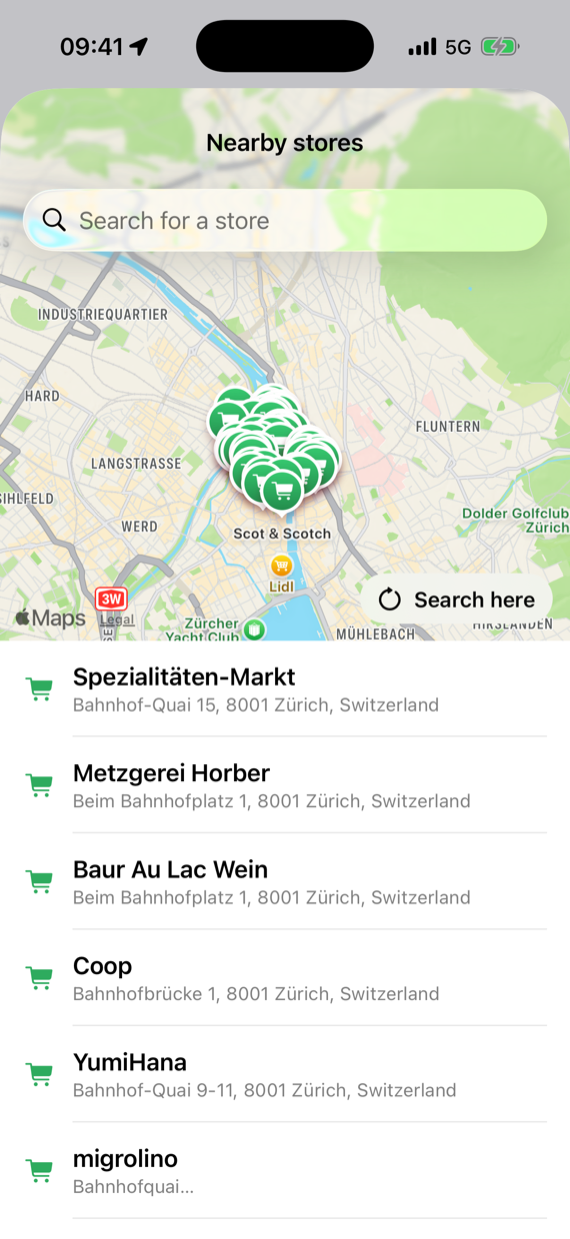
Migros is not Coop, and your Coop is not the one by the station. Every shop gets its own aisle order — and the app works out from your location which one you are standing in.
- It learns from real shopping. From the order in which you tick things off, it proposes a better aisle order after a few trips. It proposes; you decide.
- Shops nearby on the map. Find one, link it to a list, or make a new list for it in one tap. The app asks for your location only if you want it to.
- A list can belong to a shop. Then it keeps that shop's order, wherever you happen to be.
One shop is free, with everything on it. Only the second is Pro — together with the learned walking order. That is the one thing nobody else has.
Your lists stay free.
Pro removes the ads and unlocks the extras. It pays for the development — which is one person, not a company.
Free
- As many lists and items as you like
- Sorted by aisle automatically
- Shared lists and notifications
- Three recurring items
- Widget, Siri, barcode scanner
- Ads — personalised only with your consent
Pro · Yearly
- No ads
- Several shop layouts and a learned walking order
- Recurring items without limit
- Assign items to people
- AI categorisation even without Apple Intelligence
- Everything still to come
Pro · Lifetime
- Everything in Pro
- Pay once, keep it
- No subscription, no renewal
- Supports the development directly
Also available monthly at CHF 1.00. Subscriptions renew automatically and can be cancelled at any time through your Apple account — the details are in the Terms. The price shown in the App Store always applies; it varies by country and currency.
Everything else. Nothing in the way.
The rest of the app, briefly. None of it has to be switched on, found or configured.
Sorted automatically
Items land in the right aisle by themselves — in English, German, Swiss German, French, Italian and more.
Quantities as you type them
“2 l milk”, “500 g chicken”, “2 bottles of water” — the amount stays a quantity instead of becoming part of the name.
Barcode scanner
Scan a product; the name and the category come along by themselves.
Add it by photo
Photograph the packet: the words on it are read on the device and offered as the name. Nothing is sent anywhere.
Favourites & repeats
What you buy every week goes back on in one tap. And what has a rhythm puts itself back on.
Your own categories
Twelve aisles are built in. Add your own on top — and an item you move keeps the category you gave it.
Siri & widget
“Add milk to Listification” — hands free, while you cook. And the home screen shows what is still missing.
Privacy first
No accounts, no analytics tools, no crash trackers. Advertising is personalised only if you agree in the consent dialogue.
Listification Pro
Removes the ads and unlocks the extras — as a subscription or a one-off purchase. Your lists stay free for ever.
Getting started
- Create a list – choose a name, colour and symbol.
- Type items in (“2 l milk”), scan them or add them with Siri.
- Tick items off in the shop – the list is already sorted by aisle.
- After shopping: tap “Clear” and you're ready for next week.
Your data belongs to you
No accounts, no analytics tools, no crash trackers. Your lists live on your device and in your own iCloud — never on a server of ours. The free version shows advertising; whether it is personalised is your choice in the consent dialogue. Everything is spelled out in the full privacy policy.
Coming soon for iPhone
Built by one person in Switzerland, without investors and without analytics. If you like that, Pro is the way to support it — and your lists stay free either way.